April 16, 2026
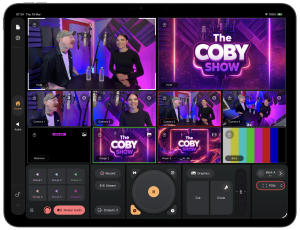
At NAB 2026, Mavis launches Mavis Studio, a new live production app for iPad that gives creators, broadcasters, and production teams a powerful new way to build and deliver professional multi-camera content affordably, with a highly portable setup.
Mavis Studio combines multi-camera video switching, playback, integrated graphics, audio mixing, recording, and streaming in a single iPad app. The product is positioned as a portable, mobile-first platform for live video workflows, with Mavis Camera integration, NDI certified with HX3 support for high-quality IP video workflows, internal recording and streaming output to all popular social platforms, including YouTube, Facebook, Twitch. For custom streaming, RTMP and SRT protocols are also supported.
The iPad has become an extraordinarily powerful creative device, and Mavis Studio is designed to unlock that power for live production. Its touch-first interface makes live production feel immediate and intuitive, with interactive multiviews for fast source selection, revealable control panels for extended functionality and support for professional codecs such as Apple ProRes. It is aimed at a wide range of real-world workflows, from video podcasts and music performances to corporate events and houses of worship.
“Mavis Studio is designed for productions that want the quality and features typically associated with a traditional broadcast production but with the ease of use and pricing model of a consumer-based app,” said Patrick Holroyd, CEO of Mavis. “There are now huge numbers of content creation teams and event producers who need professional live output, but do not want to be tied to large, fixed systems. With Mavis Studio, we are giving them a flexible, portable production tool built around the power of the iPad.”
At the heart of the app is a powerful production switcher with support for live and internal sources. Users can manage up to four live inputs and combine those feeds with multiple integrated playout tools. Video packages can also be rolled from the built-in media players, stills displayed from the image players, and HTML5-based graphics overlays and web presentations incorporated. Support for alpha-aware graphics across the application allows for lower thirds, branding and other visual elements to be layered cleanly into the live output. Preset and custom scene layouts allow operators to build anything from simple two-way interviews to richer multi-layer productions with graphics and branded visual elements.
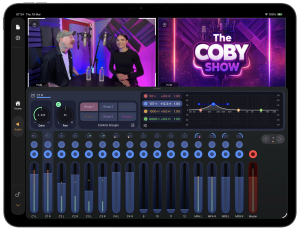
Audio is also central to the app, which is particularly important for podcasts, houses of worship, and music productions. Mavis Studio includes a 16-channel audio desk with channel strips, pan, gain, EQ, grouping and master output control, enabling users to create a polished live mix directly inside the app. Instead of treating audio as an afterthought, Mavis Studio treats sound as a core part of the production workflow.
A company presentation, university lecture, corporate event or brand live stream often needs more than a single camera but may not justify the expense of a full outside broadcast rig. Mavis Studio is NDI Certified, allowing it to take advantage of high-quality IP video running over a conventional network.
The app supports receiving up to four synchronized NDI feeds and sending an NDI output, enabling compact, flexible IP-based workflows for live events. As with other outputs, NDI can also be configured from the internal video matrix, allowing users to record a clean PGM feed while simultaneously sending a branded feed out via NDI.

“Over the past few years, we have seen NDI adoption expand well beyond traditional broadcast, and Mavis Studio is a natural reflection of that shift,” said Miguel Coutinho, Head of NDI. “Creators who want professional multi-camera output should not have to invest in fixed, expensive systems to get it. By building NDI certification into Mavis Studio, that level of production quality is now accessible to a much wider audience.”
Mavis Studio reflects the company’s wider mobile-first production philosophy: giving creators and teams professional workflows around the portable devices they already own. Recent Mavis announcements have positioned the company around flexible iPhone and iPad capture, NDI-based workflows, advanced audio, live streaming, and connected production environments. Mavis Studio also extends that thinking into a dedicated live production platform.
Mavis Studio Features
- Powerful multicamera HD production switcher
- Camera inputs via NDI and Mavis Camera (Mavis Camera also integrates with Atomos Ninja Phone and Accsoon SeeMo series for SDI and HDMI support)
- Stream (RTMP or SRT), record or NDI output any video source
- Interactive touch-first interface and multiview
- Integrated media players for video and stills
- HTML5-based graphics overlay with alpha support
- Preset and custom scene layouts
- 16-channel audio desk
- Integrated tally

The Mavis Studio app is a free download available from the App Store. The free version applies a watermark on all outputs, which can be removed for $24.99 per month or $79.99 per year. To remove the watermark and activate NDI costs $39.99 per month or $129.99 per year.
Mavis Studio App Store download: apps.apple.com/us/app/id6752835260
For more information visit: www.mavis.cloud/studio
###

- Mavis Studio for iPad Sets a New Standard in Mobile Live Production - April 16, 2026
- Atomos to Acquire Flanders Scientific - April 13, 2026
- InSync Unveils Advanced Video Processing andFrame Rate Conversion Solutions at NAB 2026 - April 9, 2026